
Hello,
Long time since our last post , had some holiday, did some work : ) but today I want to share a quick tip with everyone.
We recently had an issue in our environment with the Windows Defender component blocking and quarantaining a specific executable for a number of devices.
This executable was linked to Acrobat reader so this was a false positive.
While researching the root cause we quickly wanted to add the specific executable to our exclusion list and restore the required files from quarantine so normal operations could be resumed.
The threat name was identitied as EUS:Win32/CustomEnterpriseNoAlertBlock!cl , more on that later.
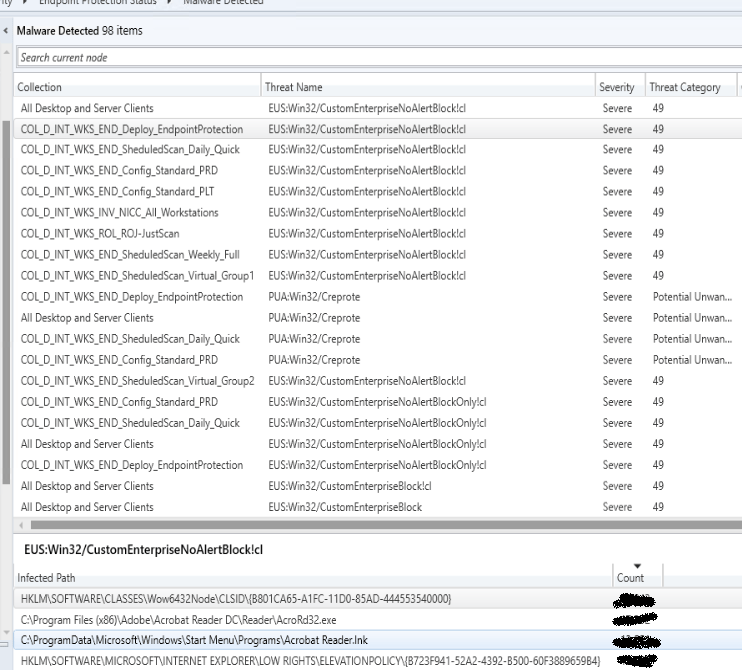
Now we are currently still in a hybrid mode so the local Windows Defender component is managed by our Microsoft Endpoint Configuration Manager.
So we added the required path to our exclusion list and refreshed the machine policy by client notification so it would be active as soon as possible.
Check !
Now we still needed to restore the files from quarantine.
In MECM we have a right click action where we can restore files for a specific threat but the problem here is that there is no clear reporting or indication of the status of the action.
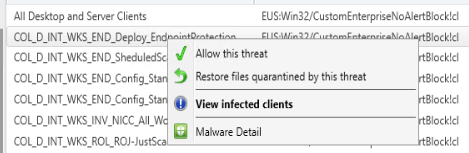
So what we did was we created a script in MECM that performs the same action.

Commandline :
& “c:\program files\Windows Defender\MpCmdRun.exe” -Restore -Name EUS:Win32/CustomEnterpriseNoAlertBlock!cl
Now all we needed was to identify the devices where the restore still needs to be performed.
In order to do so we used the configuration baseline functionality in MECM ( I am a big fan of this component ) in order to find the devices where the specific executable was missing.
In this case it is a core app so we can target all client devices.
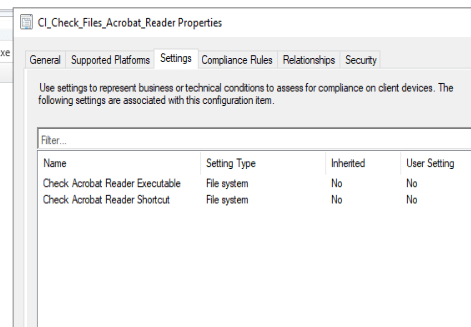
So that gave us a collection of incompliant devices meaning the restore still needed to be performed on these devices.

Then it’s easy, you can use the “Run script” functionality on the collection to start the restore from quarantine for these devices.
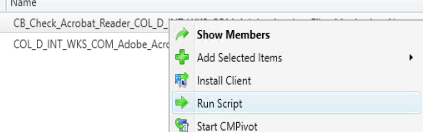
So overall a pretty good solution to fix this issue.
The root cause was an incorrect entry in the block files component of Windows Defender for Endpoint and that’s what the specific threat name indicates. Additional safeguards have been put in place there.
However we noticed that the correction in E5 took quite some time before it was actually applied to the client devices so this workaround was still required.
Enjoy & be safe !
 The-league